
SysGit v1.3.10 Release Notes: SysML v2 MCP Server, Rest API, and more
With SysGit, agents can work on your model directly.
Highlights from SysGit's latest release include the SysML v2 MCP server, Rest API, and validation workflow.
Check out the latest in requirements management, MBSE, architecture modeling, and simulation below.
Requirements Management
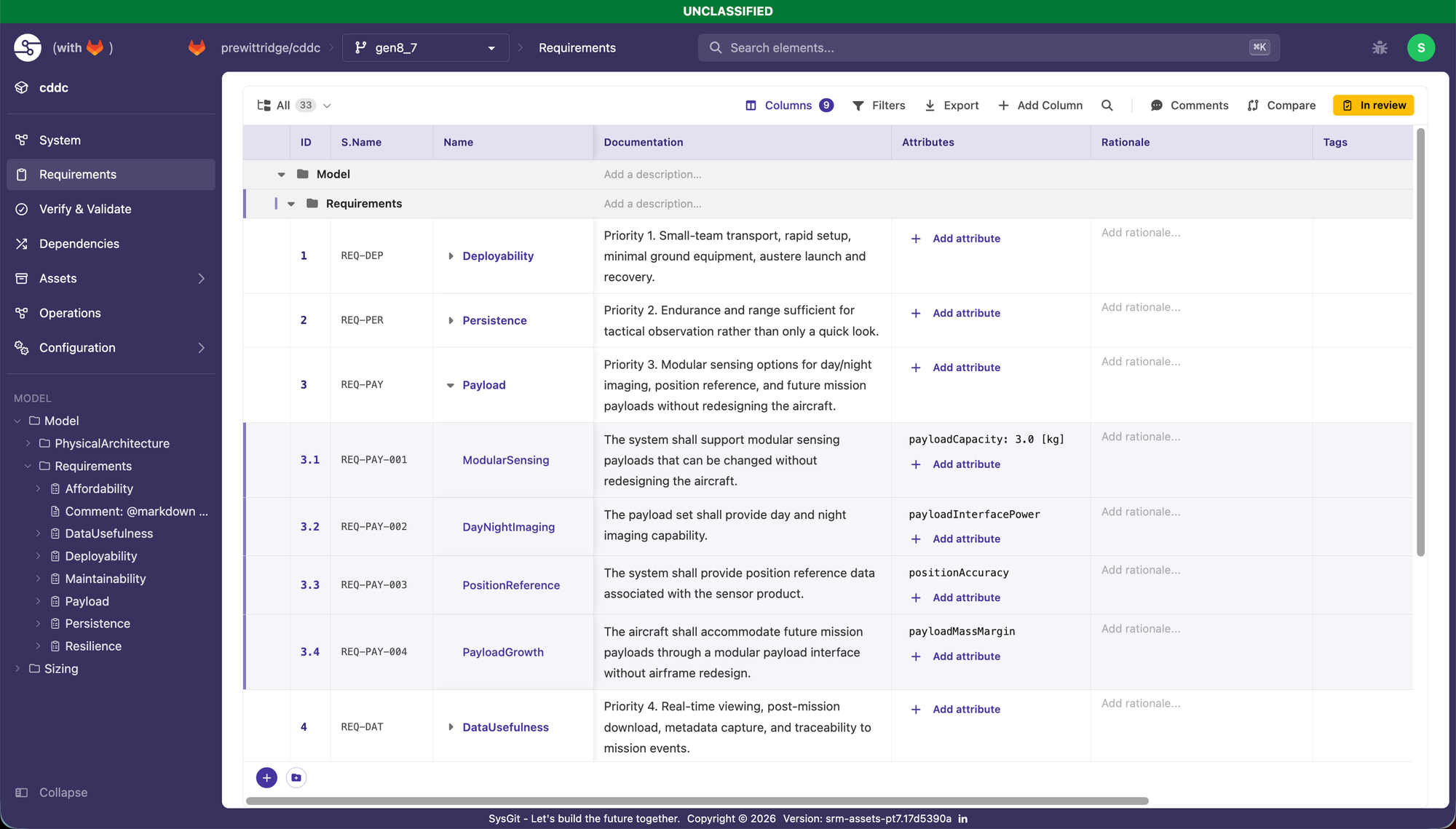
- Complete table rewrite including drag-and-drop reordering, avatar comments, and more (see below):
- Opt-in auto-generated Short Name IDs [REQ-001], configurable prefix/padding, append-only ledger, duplicate safeguards, one-time backfill.
- Package-based grouping Requirements Table with editable packages, cross-file drag/drop, breadcrumbs, redesigned menus.
- Custom enum columns in the Requirements Table. Add a typed column from the toolbar, define the values inline or reuse a project enum, and SysGit writes the SysML for you.
- Doc-string and multi-attribute metadata columns, with reusable attribute and metadata defs created straight from the table.
- The full relationship tree now shows in the requirement drawer, so you get traceability without leaving the row you're on.
- Markdown editing in table cells behaves: Enter for a new line, Tab to leave the cell while keeping focus.
- The Subject field on requirements and verifications is now a typed search backed by your object definitions instead of free text, so it actually respects SysML v2 subject semantics.
- Short-name cross-references like satisfy '1.1' and P::'D-1' resolve correctly.
MBSE & Architecture Modeling
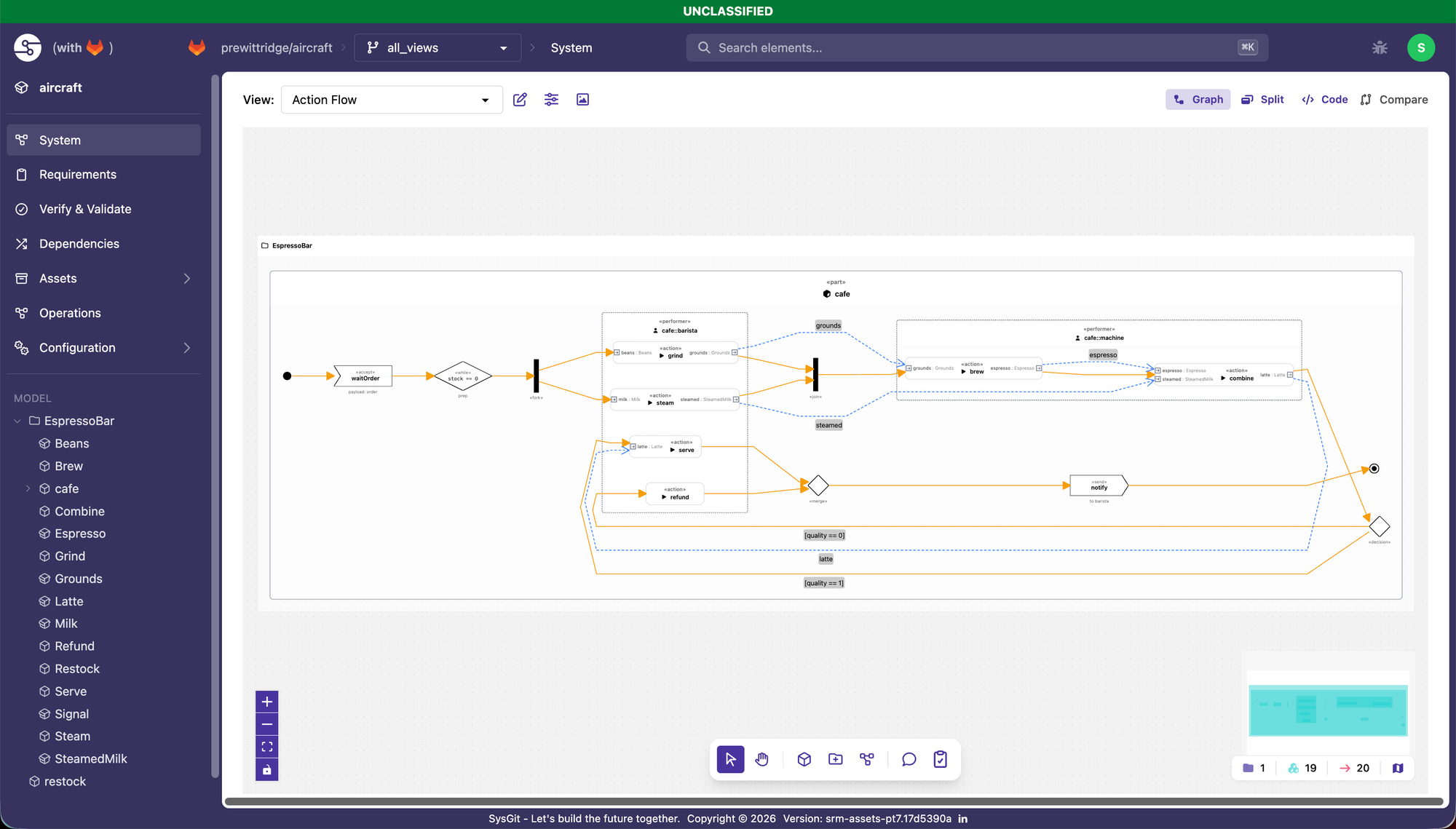
In SysGit:
- Action flows render as full activity diagrams now: swim lanes, control nodes, succession and data-flow edges.
- Sequence diagrams render in graph view, with lifelines, activation bars, and messages.
- You can draw relationships right on the canvas. Pick a type, drag between nodes, and right-click to change the type later.
- Dropping in a new object no longer opens a modal. You place it on the canvas and rename it in place.
- The graph auto-focuses whatever you just created.
- Enum values can carry colors, which show up in nodes, drawers, and table cells.
- Export a graph as PNG — current view or full auto-fit, transparent or with a background — for docs and slides.
- Exposed views walk the full nested subtree. expose vehicle::* covers the whole part hierarchy, and compound or-filters evaluate every predicate instead of stopping at the first.
- When the app writes attribute types and units, it now uses fully-qualified names, which cuts broken-reference warnings.
In sysgit-py:
- Unqualified :>> redefinitions resolve inherited attributes through specialization.
- ISQ::* resolves publicly imported members like ISQ::planeAngle, so you can drop the ISQSpaceTime::* workaround import.
- Custom prefixed units defined with ConversionByPrefix — such as micrometre, microsecond — interpret and convert correctly.
Simulation, CI/CD & Automations
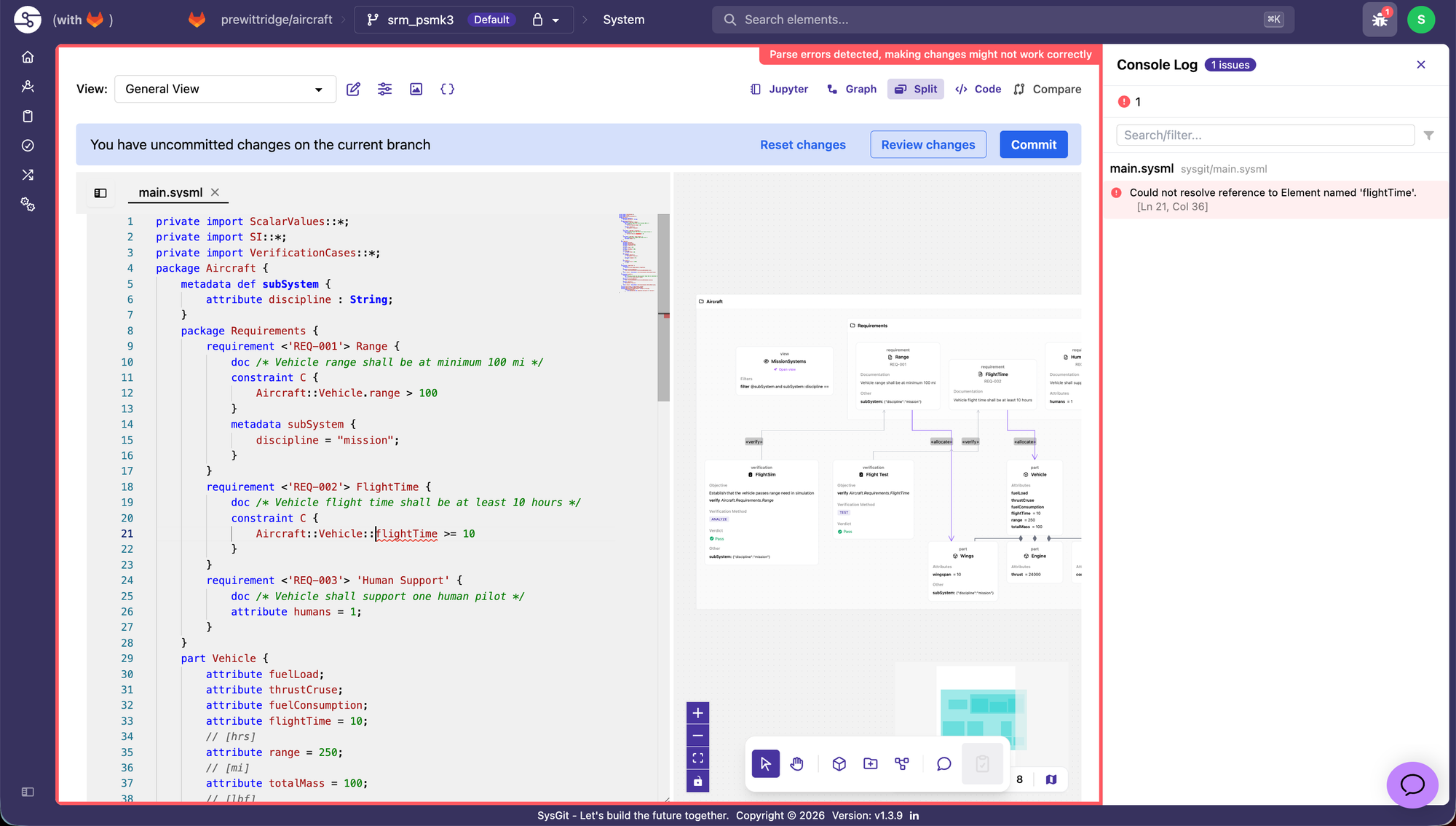
In SysGit:
- The Developer Console surfaces parser, lexer, and validation diagnostics with click-to-jump, and blocks writes when there are parse errors so you can't commit a broken model. Common mistakes have one-click fixes.
- The Pull Request diff page now has a Verifications tab: verification-case changes in a table with pass/fail/inconclusive verdicts and row-level highlighting.
In sysgit-py:
There’s a LOT here, so please check out the docs for the most info.
- sysgit check, sysgit validate, and sysgit docs from the command line.
- Models are checked at load across 28 error and 3 warning categories, with source locations — straightforward to wire into CI.
- The expression interpreter evaluates assert constraints (e.g. takeoffMass < Lander.totalMass) against rolled-up attribute sums, with unit-aware math.
- sysgit format and m.write() to format and write models back to disk.
- Load a whole directory of .sysml files as one model with sg.Model(directory=...), and query it with select, filter, get, names, and qualified_names.
AI: MCP server & models
The SysML v2 MCP server lets an agent work on your model directly, without you dumping SysML into its context. It runs on the same git architecture and the same in-memory graph as the Python library.
- Your model stays as .sysml files in git. The server loads it into a graph database built around the SysML v2 schema, and the agent makes deterministic calls against that graph. It isn't writing or patching textual notation.
- Because the model lives in the graph instead of the prompt, agents stay accurate on models far too big to fit in context.
- Changes hit specific objects. Editing a requirement updates LunarMission::Requirements::Lander::Payload; changing its mass writes to Payload.payloadMass.
- It works on branches against your GitLab or GitHub, so changes come through as reviewable diffs. Stored at rest this is just v2 notation, so you can take it to any compatible tool.
- If you do want an LLM writing notation directly, sysgit check lets it catch and fix its own errors with a human reviewing.
Curious about it in action? Watch my live-stream recording here.
SysML v2 REST API
Same git-backed models, exposed through the standard SysML v2 REST API.
- Our spec-compliant SysML v2 REST API provides access to models stored as v2 notation in your git repos.
- Useful for wiring SysGit into infrastructure that already speaks the REST API, without the overhead seen with vendors.
- Same source of truth as the MCP server and the app: notation in git, parsed into the graph.
Performance & Platform
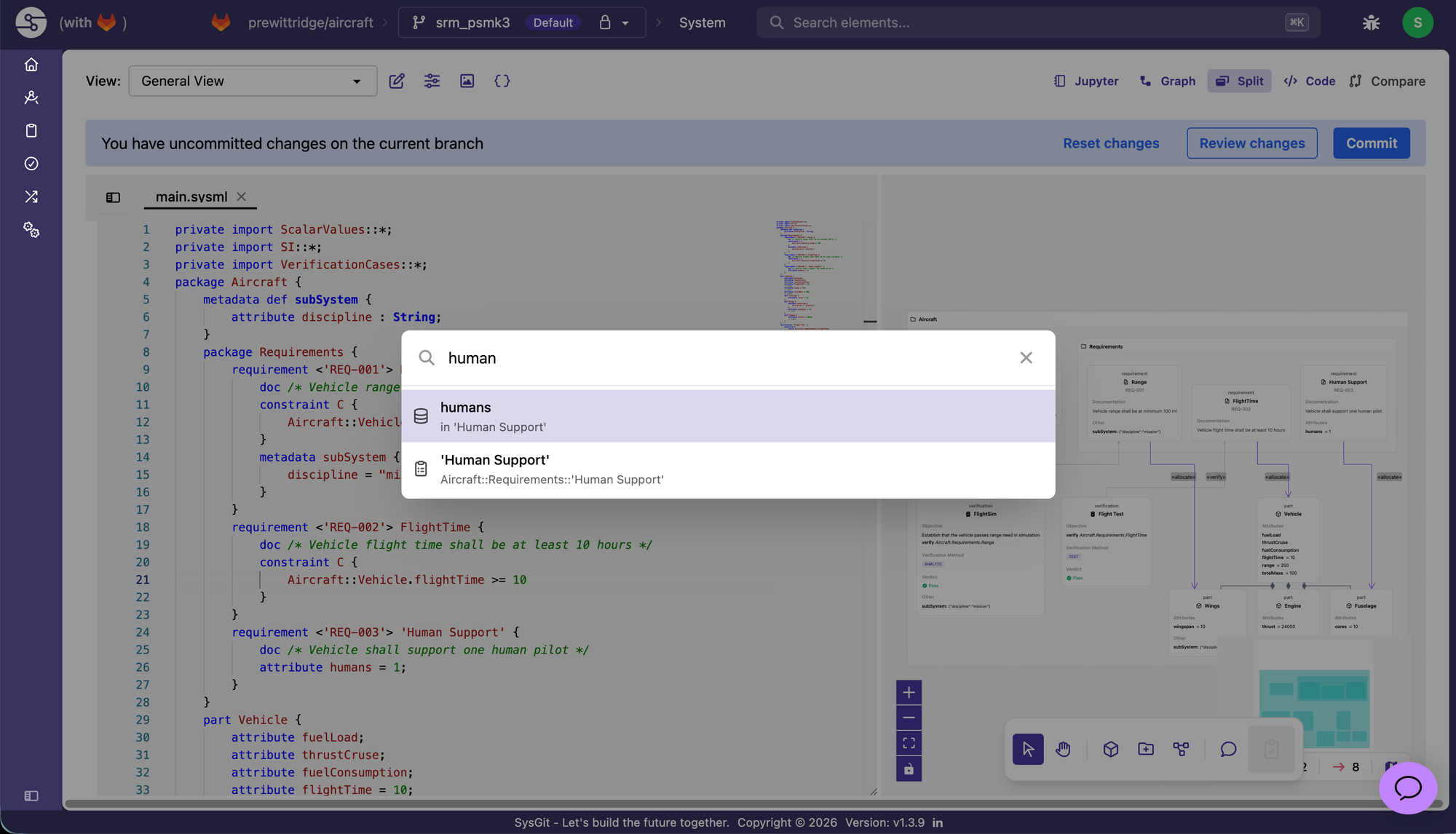
- ⌘K opens a search palette to jump to any named element. Shift+Enter opens the result in a new tab.
- Large models load smoothly again; you should see 500 to 1,000+ nodes load fine, and faster load and render across the app generally. If anything still drags, tell us.
- Branch switching is instant. The "Uncommitted Changes" modal is now gone, since read-only mode already protects you.
- File-explorer scrolling and file scrolling are decoupled in the editor.
- An issue preventing access to GitHub on Windows client builds work was resolved.
- An issue involving empty GitHub repos incorrectly redirecting was resolved.
- Specific security improvements for our air-gapped customers in sensitive environments.
If you want a quick walkthrough of the MCP server, the REST API, or the validation workflow, book a demo today. Happy Engineering!